Is there an EQ that finds the resonances in a take for you?
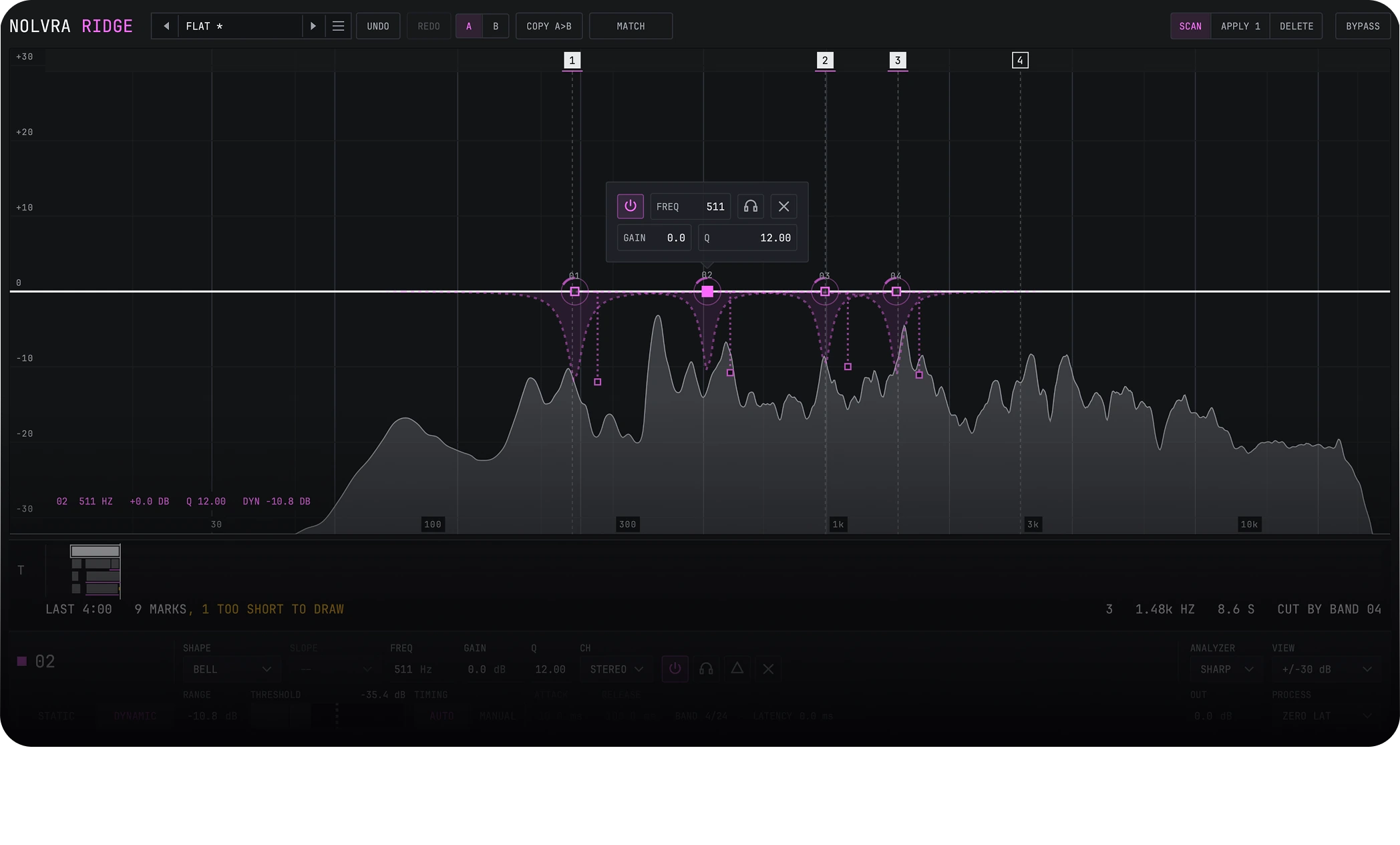
Sweeping a bell around to find the frequency that rings takes about three minutes a track, and it is the same three minutes every track. RIDGE does the sweep once, by itself. Press SCAN and it listens to the take, marks up to eight resonances, and leaves those marks on a time axis, so a ring is a moment as well as a frequency. The reason it can tell a resonance from the music is not loudness: a sung note is also a narrow peak standing well above its own neighbourhood, and in twenty seven real mixes and takes the notes measured louder than a planted ring did. What separates them is time. Music moves and a resonance does not care what is being played, so RIDGE watches a five second window and reports only what stayed through enough of it. APPLY turns the marks into bands whose static gain is flat and whose cut lives in the dynamic range, which means each one moves when its frequency rings and sits still when it does not.
The rest of it is an equalizer you can finish a record in. Twenty four bands, each with six shapes, ten slope rungs from six decibels per octave up to a brickwall, five stereo placements including mid and side, and its own dynamics section whose threshold is a level rather than a running average, so it stays put under a loud passage for as long as the passage lasts. Zero latency processing in this release. PROCESS lists natural phase and linear phase, and the plugin declares the fallback on screen rather than pretending: the bar prints MODE FELL BACK. An analyzer with three smoothing steps, which is a control the class does not usually give you. 453 parameters, published in full from the first release and locked, so automation written today reads the same in every version that follows. What RIDGE does not have is in the comparison table on this page: no spectral dynamics, no surround routing, no vintage models and no saturation stage.
How it works
Three moves, and the first one is a button
A scan that finds the ringing, a time axis that keeps it, and a level match that keeps the comparison honest.
SCAN
It listens to the take and marks up to eight resonances. APPLY turns the marks it found into bands, and one undo takes all of them back.
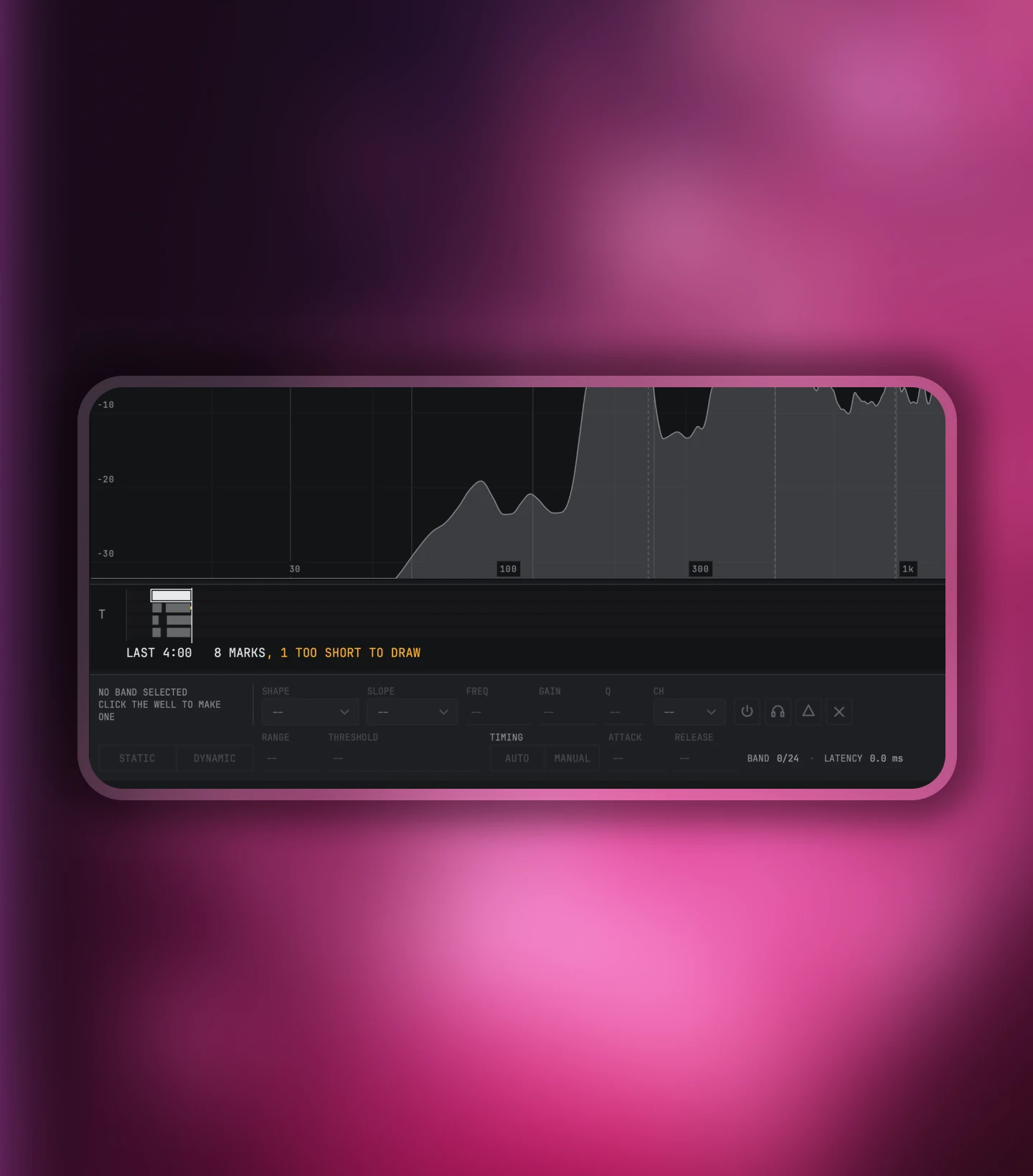
The T axis
The marks stay on a time axis, so a ring is a moment as well as a frequency. Every other analyzer in this class shows you only now.
MATCH
It reads how much level your moves added or took away and prints the figure, so A against B is the same loudness rather than a louder one.
SCAN
It finds the ringing so you do not have to sweep for it
A note is also a narrow peak above its own neighbourhood, so loudness alone cannot tell a resonance from the music. What separates them is time: the music moves and a resonance does not care what is being played. SCAN watches a five second window and only reports a frequency that stayed through enough of it.
- SensitivityHow far above its own neighbourhood a peak has to stand. It opens at 50%, and that default sits on a measured knee rather than on a round number.
- Min and maxThe window SCAN looks in. It opens at 60 Hz and 16 kHz, so the rumble under the take and the air above it are out of the argument.
- Max countHow many marks you want back, one to eight, and it opens at four.
- ApplyTakes the marks that are standing and writes a band for each one. The static gain stays flat and the cut lives in the dynamic range, so the band moves when that frequency rings and sits still when it does not.
- DeleteRemoves the bands the scan made and only those.
Dynamics
The threshold is a level, and it stays put
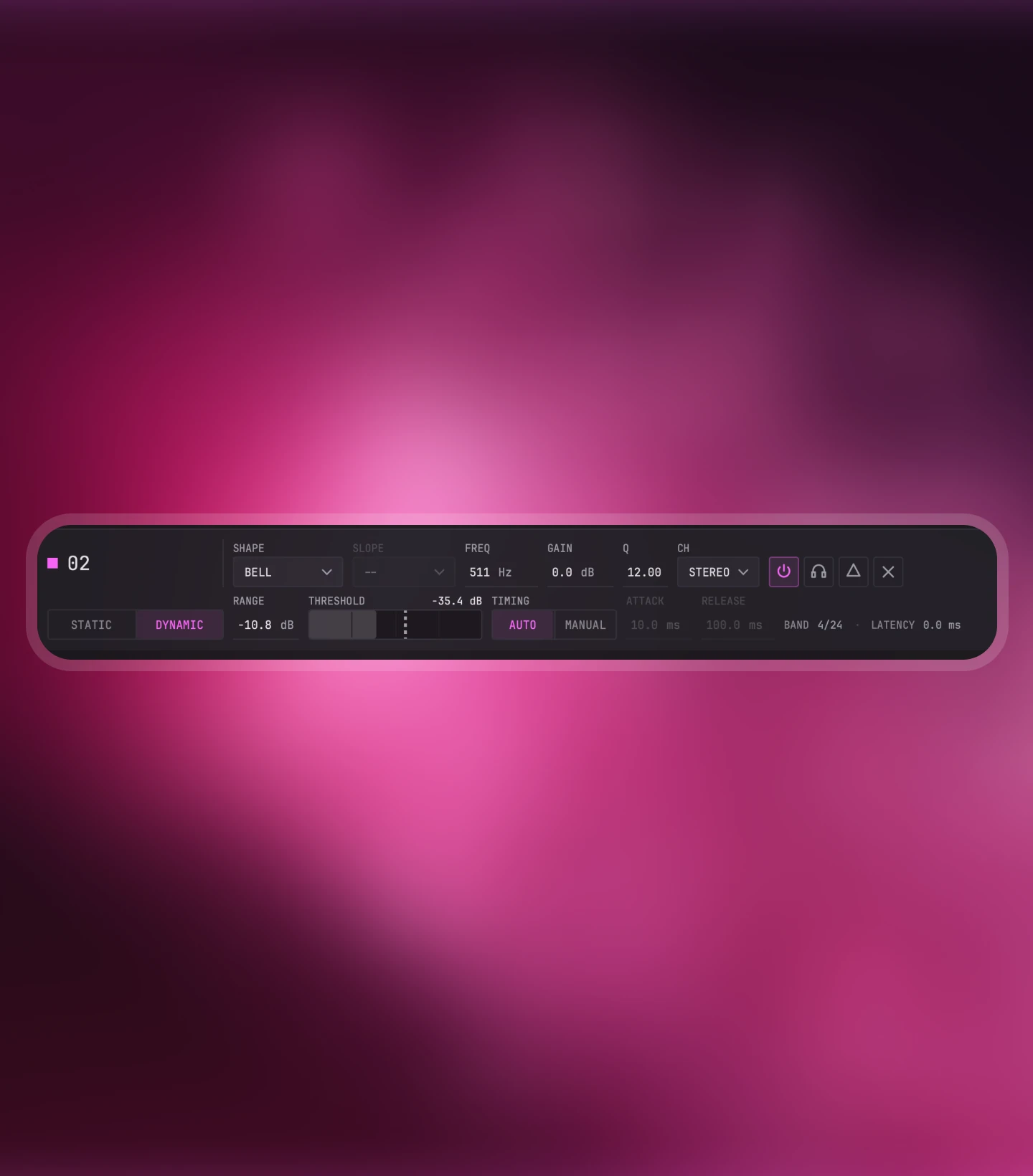
Every one of the 24 bands carries its own dynamics section, and the threshold is a level in dBFS rather than a running average of what the band was just doing. A running average chases the event and lets go while the loud thing is still loud. A level stays under a loud passage for as long as the passage lasts.
- ThresholdType one, or let AUTO estimate what this band's level ordinarily is and offset it from there. Either way it is a level.
- RangeHow far the band moves, and it means what it says: at threshold plus span the applied gain is the range, exactly. Positive opens the band, negative ducks it, zero costs nothing.
- Attack and releaseHow fast it gets there and how fast it comes back.
- SidechainThe detector listens to the band's own shape, deliberately wider than the band. A low cut or a high cut on that detector narrows what sets it off.
Compared
Where RIDGE sits, and where it does not
Checked against each maker's own product page in September 2026. Numbers only, no opinions, and the rows RIDGE loses are in the table too.
| Measured | RIDGE | Pro-Q 4 | Kirchhoff-EQ | TDR Nova |
|---|---|---|---|---|
| Bands | 24 | up to 24 | 32 | 4 dynamic + HP/LP |
| Dynamics on every band | yes | yes | yes | yes |
| Resonance scan across a take | yes, up to 8 | no | no | no |
| Time axis for the scan | yes | no | no | no |
| Analyzer smoothing control | yes, 3 steps | no | not measured | not measured |
| Spectral dynamics | no | yes | no | no |
| Vintage EQ models | 0 | 2 character modes | 32 | 0 |
| Surround / Atmos | no | up to 9.1.6 | not measured | no |
| Formats | VST3, AU | VST3, VST, AU, CLAP, AAX, AudioSuite | VST, VST3, AU, AAX | VST, VST3, AU, AAX |
| Price | $129 | $199 | $99 | Free |
Two rows in this table go against us and they are printed for the same reason the rest are: a spec sheet you cannot lose an argument with is not a spec sheet.
Product details
Technical specs
The practical details, organized for a quick scan.
Engine
Signal
- Bands24
- Shapes6: bell, low shelf, high shelf, low cut, high cut, notch
- Slopes10 rungs, 6 dB per octave up to a 192 dB per octave brickwall
- Placement5: stereo, mid, side, left, right
- PhaseZero latency processing in this release. PROCESS lists natural phase and linear phase, and the plugin declares the fallback on screen rather than pretending: the bar prints MODE FELL BACK.
- DynamicsPer band: threshold, attack, release, range and a sidechain filter
Workflow
Session ready
- ScanUp to 8 resonances per take, with sensitivity, a frequency window and a result count you set
- Time axisThirty minutes of the session, one column per scan
- Analyzer3 smoothing steps: SMOOTH, MID and SHARP
- Parameters453, published in full and locked before the first release
- Presets27 factory, plus your own
- UndoOne undo takes back a whole APPLY, all eight bands at once
License
What you get
- Price$129
- ActivationOnline activation through the Nolvra Hub, 2 machines
- Trial7 days, no card
- In the planIncluded in Nolvra All-Access
- CancellingAccess to the end of the period
Platforms
System support
- Version0.24.4
- Installer11.1 MB (macOS) · 4.8 MB (Windows)
- FormatsAU, VST3 and Standalone, 64-bit
- macOS11 or later, Apple Silicon
- WindowsVST3, 64-bit
- ManagerNolvra Hub
- UpdatesThrough Hub
Available for macOS and Windows. On Mac it needs Apple Silicon; on Windows it is a 64-bit app. VST3 and AU on Mac, VST3 on Windows. Full system requirements
Setup flow
From checkout to session
Three steps, then RIDGE is ready inside your DAW.
Buy or start the trial
Seven days, no card, and nothing charges itself at the end.
Install from Hub
The Nolvra Hub installs it and keeps it updated. Two machines.
Scan a take
Put it on the track, press SCAN, and read the marks.
FAQ
Before you buy
Is RIDGE a replacement for the class leader?
On bands, dynamics and mid/side, yes, and that is measured rather than claimed: both plugins were driven from the same parameter list across 249 cases, and bypass matched to 0.00 dB across the whole grid, cut corner frequencies to a median of 0.01 dB and bell centres to 0.08 dB. On spectral dynamics, surround routing and character modes, no. RIDGE does not have them, and they are in the comparison table on this page.
What does SCAN actually do?
It listens to the take and marks up to eight resonances, with a sensitivity, a frequency window and a result count you set. It reports a frequency only after it has stayed through enough of a five second window, because a note is also a narrow loud peak and time is the thing that tells the two apart. The marks stay on a time axis, so you can see when each one was there and not just where.
Do my Q numbers mean the same thing here?
At the same Q number RIDGE's band is narrower than Pro-Q 4's, because RIDGE uses the textbook definition of Q while Pro-Q's dial is softer by a factor of the square root of two: the measured bandwidth ratio is 1/sqrt(2), so RIDGE at Q 2.0 matches Pro-Q at about Q 2.8. Shelves follow the same convention and arrive at their nominal gain sooner. Nothing else in the two dials differs, and the support article has the numbers.
Which formats and which systems?
AU, VST3 and a standalone app on macOS 11 or later, Apple Silicon, and VST3 on Windows. 64-bit. macOS and Windows ship on the same day.
How many machines does one licence cover?
Two. Activation goes through your Nolvra Hub account, and if you cancel a subscription your access runs to the end of the period you paid for.
Is there a trial?
Seven days, no card, and nothing charges itself when it ends. RIDGE is also in All-Access, so the plan opens it along with the other plugins in the plan.
Start with RIDGE
Get RIDGE
Twenty four bands, dynamics on every one of them, and a scan that finds the ringing so you do not have to.
$129