
 MixingEQVocals
Resonance Suppressor Vs Dynamic EQ Vs De-esser
All three turn something down only while it is too loud. What differs is who picks the frequency and what sets it off, and that decides which to use.
MixingEQVocals

A step by step pass on a harsh vocal with GLOAM, a free resonance suppressor: where it goes, where to focus it, how deep, and how to hear what it took.
A harsh vocal rarely needs less treble. It needs less of three or four narrow frequencies that ring every time the singer pushes, and that move a little from line to line. A static EQ cut cannot follow that. It stays in for the whole song, so it dulls the quiet lines to fix the loud ones, and it sits a few hertz away from where the ring is on the next take. A resonance suppressor listens for those frequencies continuously and turns each one down only while it rings. This is a full pass on a vocal with GLOAM, a free one, from the insert to the final check.
Harshness on a voice comes from two different places, and they want different tools. One is level in a sensitive band: the whole region around 2 to 5 kHz is simply too loud for the rest of the mix, which is a balance problem that the harshness guide covers. The other is resonance: a narrow peak that stands above its neighbours and rings, from the room, the microphone or the singer's own voice. The second is the job here.
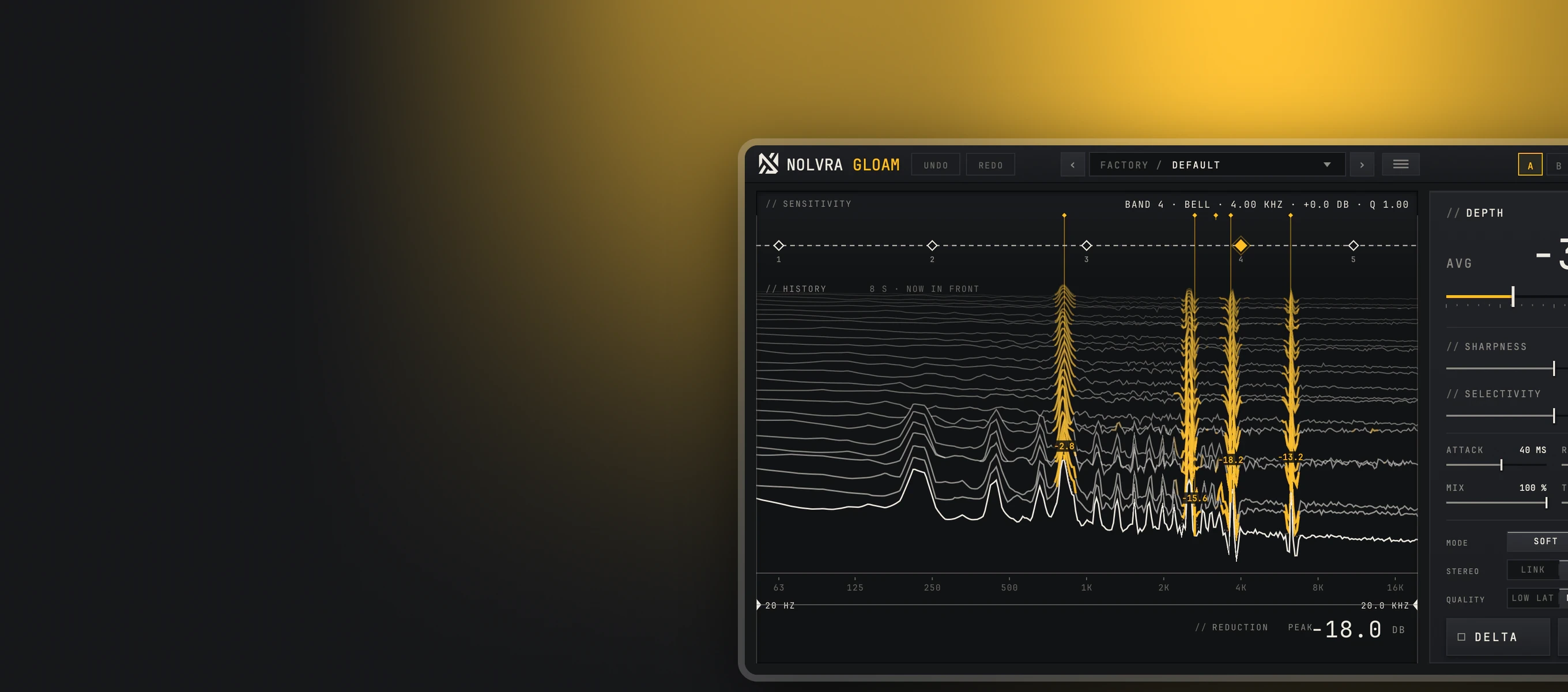
The difficulty is that a sung note also looks like a narrow peak. GLOAM separates the two in a way you can rely on while you work. A ring flickers like noise and stays at one frequency. A note arrives as a series of harmonics and moves with the melody, and that series is protected by design, so a bright vocal keeps its pitch. A steady tone under 250 Hz, which is how a held sub or an 808 bleeding into the vocal mic reads, is treated as a note too. What is left for it to cut is the part you were going to sweep for by hand.
Insert GLOAM after clean up and before the compressor. A compressor reacts to the loudest thing it hears, and on a ringing vocal that is often the ring itself, so you hear it pump on the same syllable every time. Take the ring out first and the compressor works on the performance. GLOAM looks ahead to find a ring before it cuts it, so it adds latency. The plugin reports it to the host, which keeps playback in time, but it is a mixing tool rather than one to monitor through while you record.
The default is deliberately light and already doing something: DEPTH opens at 31 percent and its readout shows the average cut in dB. If you know what kind of harshness you have, the VOCALS folder narrows the search for you. AIRY TOP works above 6 kHz, NASAL CUT between 700 Hz and 1.8 kHz, SIBILANT SOFT from 5 to 9.5 kHz and ROOM TONE between 150 and 600 Hz.
The two handles under the display decide where GLOAM may cut, anywhere from 20 Hz to 20 kHz, and nothing outside them is touched. Pull them in around the problem. For a vocal that only bites in the upper mids, a range of roughly 2 to 6 kHz keeps the body and the air out of the argument. The edges fade over a third of an octave, so a tight range does not leave a step in the spectrum.
Bring DEPTH up while the loudest section plays and stop when the harshness stops drawing your attention. Then switch on DELTA, which plays only what GLOAM is removing. You should hear thin, whistling, edgy fragments. If you can follow the words in it, it is taking the voice as well, so back DEPTH off or raise SELECTIVITY, which makes it react only to the more prominent peaks.
A suppressor removes energy, so the processed vocal is a little quieter, and quieter always sounds duller for the first few seconds. Use TRIM to bring the output back up until bypass and processed play at the same loudness, then use A and B to compare settings. Judge it in the mix, not soloed, because a ring is always more obvious on its own than behind a beat.
If DELTA is full of S and T sounds and little else, the problem is sibilance, and a de-esser keyed to that band will do it more simply. If the whole vocal is too bright on every line, a broad static EQ move is cheaper and more honest than a suppressor working hard everywhere. And if the harshness appears only in one section, it is often an arrangement or a level problem in that section. How the three tools differ has its own guide, and when you want to find and draw the cuts yourself rather than hand them over, the manual method is the place to start.
GLOAM finds the ringing frequencies by itself and turns each one down only while it rings. Free for Mac and Windows, with no account and nothing to activate.
Yes. There is no account, no licence key, no activation and no time limit, and every control is open. It runs as VST3 on Windows 10 or later and as VST3 and AU on macOS 11 or later.
Before, in most vocal chains. A compressor reacts to the loudest part of the signal, and a ring that is still there pulls the whole vocal down every time it sounds. Remove it first and the compressor sees the performance.
It can if it is set too deep. Keep DEPTH light, raise SELECTIVITY if it touches things that were fine, and listen to DELTA: if what it removes sounds like the singer rather than the harshness, it is taking too much.
It is not built for that. It looks ahead to find a ring before it cuts it, which costs latency, so use it while mixing and record the vocal dry.
Guides
You may also like
MixingEQVocalsAll three turn something down only while it is too loud. What differs is who picks the frequency and what sets it off, and that decides which to use.
 MixingVocalsEQ
The sweep and boost trick finds notes as easily as it finds resonances. What actually separates the two is time, and that changes how you should hunt.